Product update
Smarter incoming call recognition
Inbound facility calls match saved customer phone numbers so staff see a name, open the record, and jump to Inbox faster.
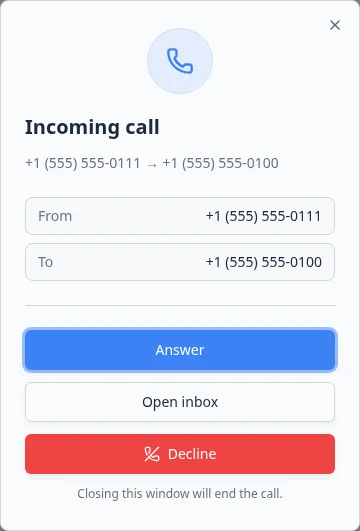
“Who is this?” should not be the first question on every ring.
Why we built it
Inbound calls arrive while staff are on Schedule, Parking, or Payments—not already in Inbox. Smarter incoming call recognition matches the caller’s number against the customer’s saved primary phone (E.164, digits-only, and common last-10 formats), attaches the customer to the call log, and passes the name into the Incoming call toast and dialog. Answer from anywhere in the dashboard, open a customer sheet with cars and contacts, or Open inbox on the right thread without searching by number first.
Who it is for
- Front desk staff using in-app browser calling (Handle incoming phone calls).
- Teams with a facility Twilio line configured under Configure communication settings.
- Anyone keeping customer mobiles accurate after More consistent international phone entry.
What you can do
- See the customer name on the incoming call alert when the number matches a record.
- Open the customer context sheet during the ring or active call—cars, contacts, and quick links included.
- Jump to Inbox prefilled for that customer when you need texts or email history.
- Create a customer from an unknown caller without losing the live call flow.
How it fits your day
Keep primary phone fields current on active collectors; matching uses the main line on the customer record. If recognition fails, verify formatting on the contact record, then create or merge duplicates before the next call.
Get started
Place a test call from a customer’s saved mobile while logged into the dashboard. Confirm the Incoming call UI shows their name, open the customer sheet, and use Open inbox to verify the thread matches.
Questions about this update?
Book time with our team or browse the rest of the changelog.